
Try articulating what you’re going to do before you do it.
You benefit in two ways:
1) You clarify what you think by taking what you think and writing it down – this forces you to choose words that accurately describe the steps, instead of trusting that your thoughts are coherent.
2) As you approach the task itself, you will find you need to adjust from the written plan. The delta between what you wrote and what you do is instructive in itself.
It’s not an exercise to test if you can predict every facet of the task before you begin. It’s not to rate your planning. It’s a quick exercise to strengthen your ability to think before you move and articulate what you think. As you do this more, your thoughts will start to become closer to what you write.
—
Here’s a small Excel workout:
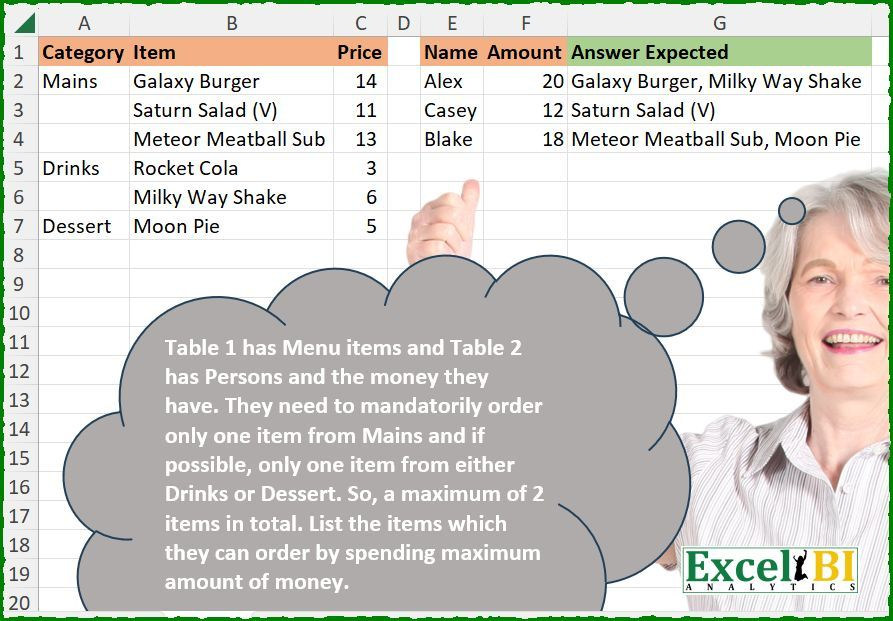
Here’s what I wrote before attempting to solve it:
Load the first table into a DataFrame. Fill down the Category column. Load the second table into a DataFrame. Create a group that is True where Category is Mains or False where it is not Mains. Do one of the following:
1) A cross join of rows with group=True with rows with group=False, giving us every pair of Mains and non-Mains
2) User itertools (I think it’s in there, not looking it up right now) to calculate combinations of Mains with non-Mains
Then, calcualate the sum of the pairs of mains and non-mains. Then look up from these pairs that pair whose price-sum is largest but not greater than the Amount for each person in Table 2. This is the pair which has them buying one main and one non-main and spending the maximum amount. Return the comma-separated list of Main and optionally Non-Main for each person.
OK, so I’ve written that down, and haven’t written any code. Now I’ll go and write the code.
Some time later
There may well be better ways to solve this, but this is what came out at first pass:
df1 = xl("A1:C7", headers=True).ffill()
grp = df1.Category=='Mains'
# add a key constant to do the crossjoin merge
df1['key'] = 1
merged = df1[grp].merge(df1[~grp],on='key')

# discovered this merge doesn't contain rows for 'Main with no non-main'
merged.rename(columns={'Category_x':'Category','Item_x':'Item','Price_x':'Price'},inplace=True)
# add the rows for 'Main with no non-main'
merged = pd.concat([merged,df1[grp]])
merged.Price_y = merged.Price_y.fillna(0)
# convert to int so the merge_asof will work later
merged['price_sum'] = (merged.Price + merged.Price_y).astype(int)

# reset index so the original sort order can be used later
df2 = xl("E1:F4", headers=True).reset_index()

# merge and get closest match
# discovered this requires merge keys to be sorted
result = pd.merge_asof(
    df2.sort_values('Amount'),
    merged.sort_values('price_sum'),
    left_on='Amount',
    right_on='price_sum'
).sort_values('index')[['Item','Item_y']]

# join the columns on each row
result.apply(lambda x: ', '.join(x.dropna()),axis=1).values
There’s the code I wrote. I searched for a few hints along the way, but didn’t use AI because this exercise is not about that.
When I wrote the plan, I knew I needed to do a join with an inequality predicate, but I wasn’t sure of the exact function I needed. It turns out pd.merge_asof is a useful way to do ‘largest value less than’ on merge keys, but it does mean the merge keys need to be sorted, which makes for a few hoops to jump through.
As I worked through, I also realised that the initial cross-join merge which made those ‘main+non-main’ pairs, which worked fine at first glance, did not include rows for ‘main and no non-main’, so I had to add those after the merge operation. This then meant I needed to calculate the price_sum after that addition, which ended with the price_sum being the wrong type for the merge_asof, so I needed to use astype to correct that.
Summary
All in all, I think this was a useful exercise and writing it down like this has reminded me about merge_asof, which I think I saw many years ago but never used, and of how if you introduce NaN into a an int column after using pd.concat, the column will be coerced to a float, meaning any arithmetic using that column returns a float. Python basics, but worth remembering!
Leave a Reply